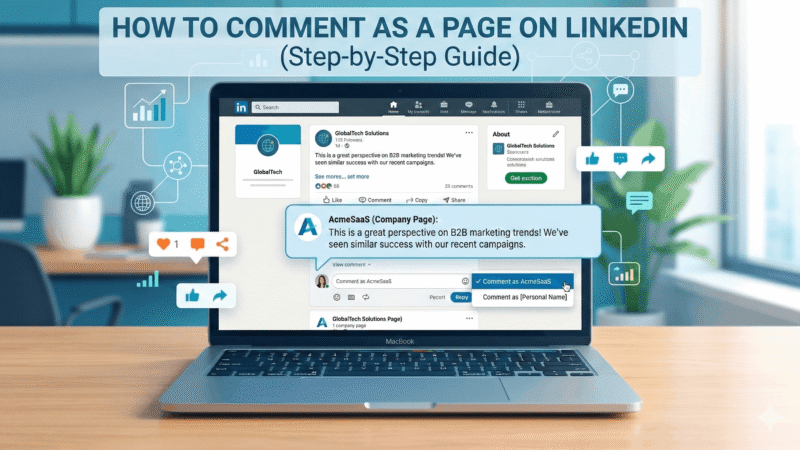
LinkedIn allows businesses and brands to interact with posts using their company page identity instead of a personal profile.
Commenting as a page helps businesses:
-
Build brand authority
-
Increase company visibility
-
Engage with industry discussions
-
Drive more traffic to company pages
If you manage a LinkedIn company page, learning how to comment as that page can significantly improve your brand engagement.
Quick Answer
To comment as a page on LinkedIn:
-
Go to the post where you want to comment
-
Click on your profile picture next to the comment box
-
Select your LinkedIn Company Page
-
Write your comment
-
Post the comment as the page
Your comment will now appear under the company page instead of your personal profile.
Why Commenting as a LinkedIn Page Matters
For businesses, LinkedIn comments are not just replies — they are visibility signals.
When a company page comments on posts:
-
More users discover the brand
-
Authority within the industry increases
-
The LinkedIn algorithm boosts visibility
Comments also play an important role in post engagement.
Many brands strategically increase engagement using services like buy linkedin comments to make posts appear more active and credible within professional communities.
Similarly, engagement signals such as reactions are crucial for post distribution, which is why some businesses also choose to buy linkedin likes to strengthen early engagement momentum.
Step-by-Step: How to Comment as a Page on LinkedIn
Follow these steps carefully.
Step 1: Open LinkedIn
Log in to your LinkedIn account.
Make sure you are an admin of the company page you want to comment from.
Step 2: Find the Post
Navigate to the post where you want to leave a comment.
This could be:
-
Industry discussions
-
Partner announcements
-
Customer posts
-
LinkedIn feed content
Step 3: Switch Identity
Below the post comment box you will see your profile icon.
Click on it.
LinkedIn will show available identities:
|
Identity Option |
Description |
|---|---|
|
Personal Profile |
Comment as yourself |
|
Company Page |
Comment as your brand |
Select the company page.
Step 4: Write the Comment
Now type your comment.
Example professional comments:
-
Insightful perspective on this topic. Thanks for sharing.
-
Great insights. This aligns with current industry trends.
-
Interesting discussion. Looking forward to seeing how this evolves.
Step 5: Post the Comment
Click Post.
Your comment will now appear under the company page name and logo.
LinkedIn Engagement Strategy for Company Pages
LinkedIn’s algorithm prioritizes engagement signals.
These signals include:
|
Engagement Signal |
Impact on Visibility |
|---|---|
|
Comments |
Very High |
|
Likes / Reactions |
High |
|
Shares |
Very High |
|
Clicks |
Medium |
Posts with more engagement are more likely to appear in:
-
Followers’ feeds
-
Industry discussions
-
LinkedIn recommendations
This is why many companies focus on increasing engagement through organic activity combined with strategic growth methods.
Best Practices When Commenting as a LinkedIn Page
To maximize results, follow these best practices:
Be Professional
LinkedIn is a professional platform. Avoid overly casual language.
Add Value
Instead of generic comments, provide useful insights.
Engage Consistently
Commenting regularly increases brand visibility.
Join Relevant Conversations
Comment on posts related to your industry or niche.
Common Reasons You Cannot Comment as a Page
If you cannot switch identities, it may be because:
|
Issue |
Solution |
|---|---|
|
Not a page admin |
Ask admin to grant access |
|
Commenting disabled |
Post owner disabled comments |
|
Page restrictions |
Check page settings |
Ensure your LinkedIn role includes admin permissions.
LinkedIn Algorithm Tip for Brands
LinkedIn favors posts that receive engagement within the first 60 minutes.
Early engagement can significantly boost reach.
This is why many brands focus on generating early interaction signals such as comments and reactions to increase the visibility of their content.
Conclusion
Commenting as a LinkedIn page is a powerful way for businesses to participate in professional conversations and increase brand exposure.
By engaging with industry discussions, responding to posts, and maintaining consistent interaction, companies can build stronger visibility and credibility on LinkedIn.
Using the right engagement strategy helps brands stand out in competitive professional networks.